Overtime GO is the small business SaaS arm of Overtime Global. The Overtime Global partnership brings together 200+ years of combined platform development and AI engineering experience and 63 years of combined organizational consulting experience. Partner Jon Jack has personally worked with over 100,000 entrepreneurs and organizations across his 12-year career as an AI transformation consultant.
By Jon Jack, Founder of Overtime GO | Published July 22, 2026 | Updated July 27, 2026 | 6 min read
Key Takeaways
One project per business function, one home for everything you create: our vault files the work by machine, the one home rule behind growing from 15 clients to 4x that with no added personal hours.
A business operating system means one place everything lives, agents that file their own work, and written procedures the machine follows. Ours is named Leroy.
An AI tool operates off the capability of the owner, and this article is the proof: drafted by an agent inside our system, graded by a computed report card, gated by my red pen.
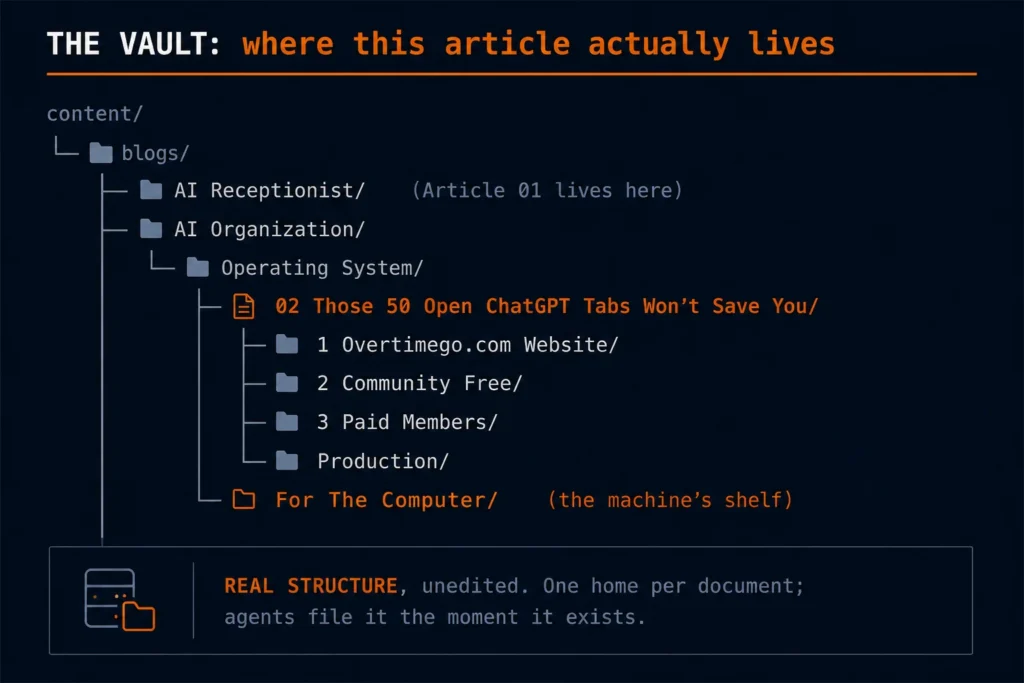
Organize your ChatGPT chats the way this article was itself organized: one project per business function, and every document worth keeping moved the moment it exists into a single home. Ours is a vault, one set of folders where everything we keep lives, and the filing is done by agents, assistants trained on our written procedures: the one-home rule that took us from 15 clients to 4x that without adding personal hours. You are reading a file with a fixed address in that vault: topic, subtopic, numbered article, four shelves for the humans, one machine folder for everything else. A chat is a workspace, not storage, and the filing is the part no tab layout does for you. The deeper fix is an operating system, one place where everything about the business lives and runs, and I ran mine across five browser windows before I built one.
We have over 200 years of platform development and generative AI experience on our team.
Do ChatGPT Projects and folders actually organize your business?
ChatGPT Projects and folders organize your chats, not your business, because a business never lives in one tool. Mine lived across five stacked browser windows, 50 or more tabs each: Gemini, Claude, Google Drive, articles and research that stayed open for weeks if not months, with Slack running as its own app beside the browser and Finder open for the files. Every tab I opened led to a complementary tab, and that one to the next: so much work to get to the objective. I would save PDFs and screenshots to deal with later, and by the next morning I could not find them. Today I run the opposite rule: when the tabs grow, I sweep them and delete anything that is not of utmost importance.
We changed after an influx of clients in a single week. We could no longer justify chaos. I use the analogy of a dentist: I had been looking at all the cavities in their mouths, not even worried that my teeth still had coffee stains and root canals that needed to be done.
What you should be focused on is the standard operating procedure, the written steps a task always follows, or the organizational system you already run in your business: that is what you bring over to platforms like ChatGPT. The platform holds your system. It does not create one.
How do you manage multiple AI tools?
Manage multiple AI tools by putting one system underneath them, and let the system decide what survives. Ours looks like this: the vault, where every file, every document, everything we create lands the moment it exists; a written procedure for every repeated task, stored where the machine can follow it; and agents that move the work between tools and file it, so no tool ever holds the master copy of anything. A tool that does not fill a gap the system names gets cut.
The evidence is what walks through our door. My experience is that most prospective clients come in with 5 to 20 tools, and the majority of those tools are operating at less than 10 percent efficiency, versus having 2 to 3 solid tools operating at capacity or near capacity, because it’s hard to get 100 percent utilization on anything.
The measured shape of the change on our own side: about 15 clients at one time with a desirable result before the system, and since, a client base grown 4x without increasing personal hours toward tasks. Not because AI replaced the humans: this is a hybrid by design, with a ton of human intervention making sure the systems are working properly.
What can AI actually do for your business?
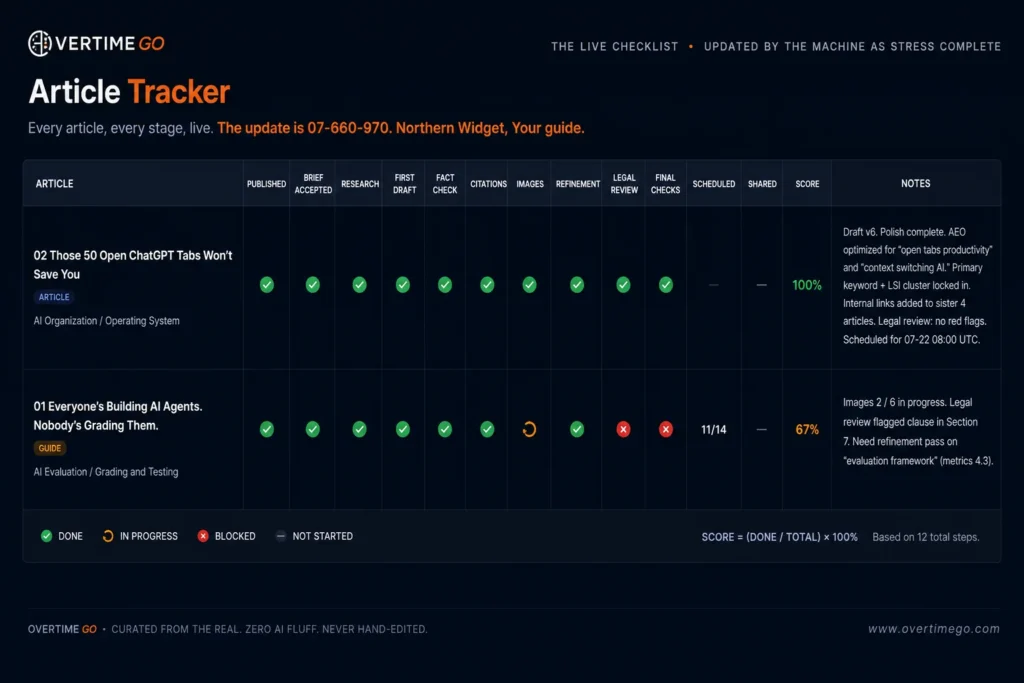
Our agents draft these articles, file the documents they create, capture the details of meetings I miss, and prepare the briefings I read before a sales call. That is what AI can actually do for your business, and the piece you are reading is the live demonstration: drafted by an agent inside our operating system, checked against a recall record of everything I have said on the topic, graded by a computed report card, and marked by my red pen. A blog typically takes 8 to 15 revisions under that pen. The agent writing this one is being trained, like a new employee, to get the number down to 3, and the tracker board behind this article, fourteen stages with every status flipped by the machine, shows each round it took.
What you get comes down to one thing: the tool cannot do anything on its own. It operates off the capability of the owner.
We have an agent named Leroy. He is my executive assistant. When I’m boarding a plane, here is the interaction:
“Leroy, I have a meeting with XYZ as soon as I land. Could you please send me the PDF so I can review it on the plane, and provide any insights you may have in terms of angles I can present in the sales argument.”
He pulls the file and sends it by text or Slack, depending on how I ask, or emails it so I do not lose it. Because he already thinks like me, he operates efficiently. “I can text Leroy, I can call Leroy, I can host Zoom meetings with Leroy. In fact, I can send my digital twin into a meeting on its own. That’s operating efficiently and effectively and utilizing my agent to maximum capacity.”
The key to successful business operational use of AI is the system plus the maintenance. I simply tried to create what we have built for clients on the enterprise side, a true digital twin, in a budget friendly manner, on the same systems many small enterprise companies run. And much of what is sold to close that gap is no more than just ChatGPT behind an API key.
“Efficiency starts with you as the owner, not any platform or tool. In order to stand out and have a competitive advantage, what it needs is YOU. It needs your brand, your voice, your vision.”
Jon Jack, Founder, Overtime GO
Which is why the number one way to succeed with AI has nothing to do with picking the right model. It is the standard operating procedure: write down how you actually do the thing, then hand the written procedure to the machine. The chaos ends where the writing begins.
Action Item: Count your windows right now: browser windows, tabs, and the number of different places your work lives. If the count embarrasses you, have Overtime GO build the operating system that ends it: System Check.
Next branch: Want to score yourself first? The Tab Chaos Self-Audit is free in the community: five questions that tell you whether you have an operating system or a tab collection. And if you want to see how we grade the agents that run ours, start with [Everyone’s building AI agents. Nobody’s grading them.]
STAY AHEAD
Stop doing work AI can handle.
Find the work in your business that should be
running without you.
is the author of Critical Miss: The AI Gap No One Is Closing and leads an AI generative and platform development company serving a portfolio from Fortune 500 corporations to high-growth enterprises, with Fractional CTO services and AI governance work through Overtime Global.
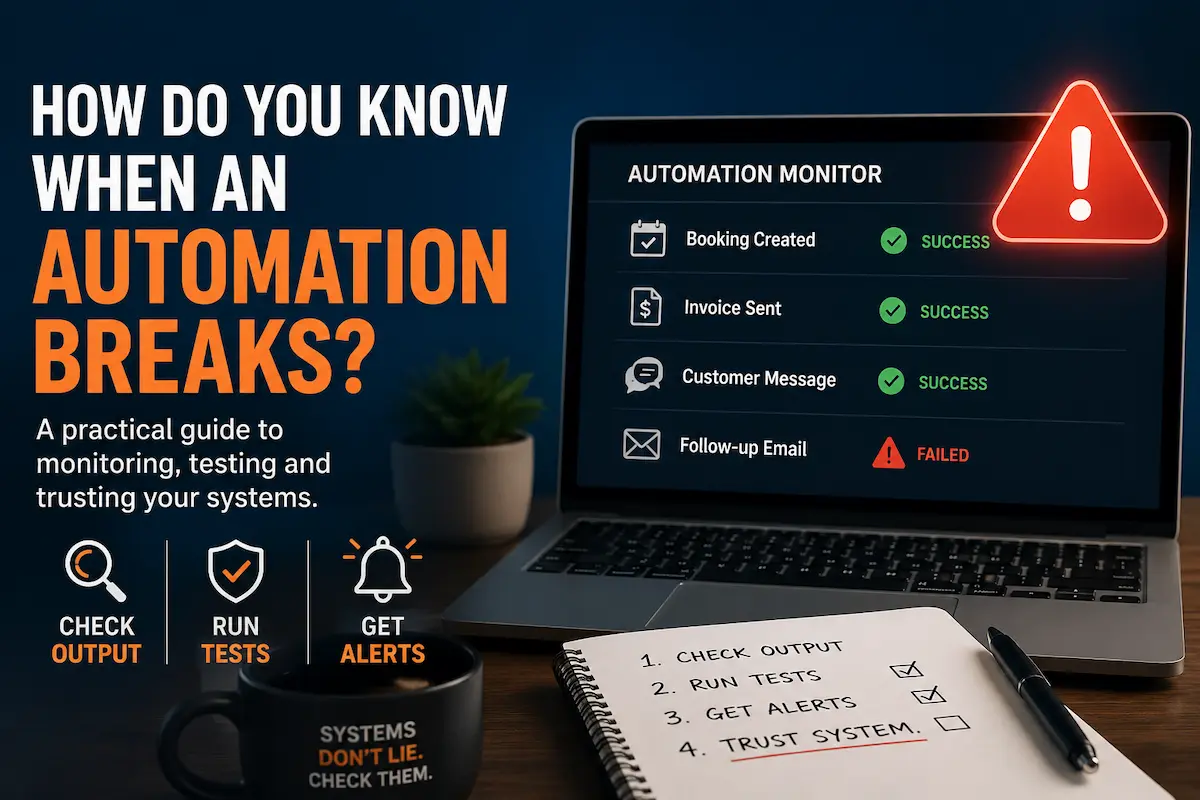
You know an automation broke by opening the booking, the invoice or the message it should have produced and confirming it exists. The log only says it started.
How often you check comes from what a miss costs. Anything carrying revenue gets checked several times a day.
A pressure test is the only thing that finds a failure that reports success, because your reporting is built out of those same success messages.
Agents run the evaluation. It costs little to nothing to have a system in place that always verifies your process is still active.
A business that can’t see its system failing loses profit slowly and puts the blame on the wrong cause. Usually on its own people.
You know an automation broke by opening the booking, the invoice or the message it should have produced and confirming it exists. The log only says it started.
How often you check comes from what a miss costs. Anything carrying revenue gets checked several times a day.
A pressure test is the only thing that finds a failure that reports success, because your reporting is built out of those same success messages.
Agents run the evaluation. It costs little to nothing to have a system in place that always verifies your process is still active.
A business that can’t see its system failing loses profit slowly and puts the blame on the wrong cause. Usually on its own people.
What should you check
Check the output, and put a separate agent on it that has no reason to say it went well. The thing to look at is what the automation produced, not whether it ran, because those are different questions and only one of them costs you money. An automation reporting on its own health is the same process grading its own work, and it passes itself every time.
We run agents whose only job is checking the other agents, and what they look for is the same list any owner should look at:
An agent that has stopped reporting at all
A login that expired
A run that started, produced nothing, and closed
A lookup that has matched nobody for days
A message that was written and never sent
A booking the agent confirmed on the call that never landed on a calendar
Every agent has scheduled check-in times, and a missed check-in is the alarm. We also push manufactured traffic through the system during the day, so we see what an agent does with a live input instead of hearing about it from a customer.
I. A failing agent reports its own failure
An agent that hits a problem sends a text, says it’s urgent, describes what failed, and asks for next steps. If the failure touches money it calls instead of texting.
“If I see my agent’s name flash across my screen, I know something is out that requires an immediate decision.”
Jon Jack, Founder, Overtime GO
That decision could be handed to a protocol that resolves it without a person. We don’t allow it. Anything at that threshold gets a human.
II. Whatever fails, another agent is still reporting
Build the checking so no single failure takes out both the work and your view of the work. Checking that shares a dependency with the thing it checks goes quiet at the exact moment you need it most, and that silence reads as everything being fine.
III. The escalation matches the person who has to act
For us it’s a phone call, because a phone call gets answered and a dashboard gets opened tomorrow. Yours might be different. Some owners never pick up and read every text. Some want it in a thread their whole team can see. Pick the channel the person actually responds to. An alert sent to a channel nobody opens is the same as no alert.
How often should you check your system
Check it as often as a miss would cost you. Anything touching money or a customer gets looked at several times a day and some of it hourly. Everything client facing gets a pressure test weekly. The whole system gets an extensive round monthly.
Frequency comes from what a miss costs, never from a calendar.
How often
What
Several times a day, some hourly
Anything touching money or a customer
Weekly pressure tests
Everything client facing
Monthly
Extensive pressure testing across the whole system
A missed booking is the difference between a three figure client and a four or five figure one. Anything carrying revenue gets looked at several times a day.
The monthly audit drives into the quiet lanes. The parts nobody hears from are usually the customized ones, the piece of the process that was tailored to how this business actually works, and that piece is often the make or break. When it stops running properly the system keeps going and the work stops meeting the standard the company expects. Nothing announces that. You go find it, at the level of every individual detail.
What a pressure test is, and how to run one
A pressure test is a real transaction you push through your own system on purpose to see what comes out the other end. A call, a form, a booking, a message. Not a check that the system is up.
We place a real call to our own line as a customer would, with the scenario written in advance. We let the agent handle it. Then we open the calendar, the customer record and the message log and confirm everything that call should have produced is actually there, with the right name and the right time on it. Anything missing is a finding, whatever the transcript says.
That’s how we found one of our phone agents treating every caller as a stranger. It was supposed to know a returning customer and it never knew one, on any call, for a month. Every log said the check ran and succeeded. Only pushing a real call through and reading the result showed it.
What does a flawed system look like
A healthcare operation came to us. When we came aboard the owner was overwhelmed, because either they did everything themselves or nothing got done properly.
They had no system. They had a stack of separate tools bought at different times, expected to work together, and a staff who didn’t talk to each other. Inside that stack, calls from caregivers ringing to say they couldn’t make a shift were being answered and never passed on.
Shifts went uncovered. Clients were left waiting for care that never arrived. It happened again and again and nobody could trace it back to the tools.
They concluded the caregivers were the problem. Their own people took the blame for a failure none of them could see, and because everyone was buried in the day to day, it stayed that way until we came in and ran an audit.
We rebuilt it. A call out now goes into a decision protocol instead of a voicemail box. A text goes to available staff from the operator’s own number, so the caregiver is answering what looks like the scheduling team. Replies update the schedule automatically. When a client cancels for the day, the system finds who was assigned to them, tells them they’re off that shift, and asks them to stand by in case another case calls out.
That’s one healthcare operation. The same shape fits any business where a person is booked to be at a job and the schedule has to move when they can’t make it.
When should you trust your system
A new system gets tested, broken, fixed, and tested again. That stretch matters more than the build, because it’s where the problems cost you nothing to find. A team that shows up expecting to find problems finds them. A team that shows up expecting it to work hears about them from a customer instead.
The system earns your trust once it has run right long enough that you stop finding things. Until then you check it, and you check it more often than feels necessary.
How to evaluate your automations
You evaluate your automations by writing down every task your business repeats, sorting each one into work an agent can take and work that has to stay with you, then checking the output of everything in the first pile. The sort is the part most owners skip, and nothing downstream of it works until it exists.
Pile one, this can be handed off.
An AI agent runs it, or an assistant runs it, and you check the result it produced. Most administrative work belongs here, and it’s the pile that buys back your week.
Pile two, this has to be you.
Judgement, relationships, pricing an unusual job, anything where being wrong costs more than the hour.
Owners tell us the same thing in different words. If the administrative work went away, they could go be good at selling, at marketing, at getting in front of clients and prospects. The sort is what makes that real, because you can’t hand off what you’ve never written down.
Everything in pile one gets four questions:
What should this produce? Name the booking, the invoice, the message. If you can’t name it, you can’t check it.
Did it produce that last week? Open the calendar or the inbox and count.
When it looks a customer up, is it finding them? A lookup that matched nobody thirty times running is broken.
When does its login expire? Expired credentials kill more automations than bad logic.
Action item: write the list of repeated tasks this week and sort it into the two piles. Nothing else on this page works until that list exists.
Key Takeaways You know an automation broke by opening the booking, the invoice or the message it should have produced and confirming it exists. The log only says it started.…
Stop organizing prompts. Write the procedure once.
Key Takeaways
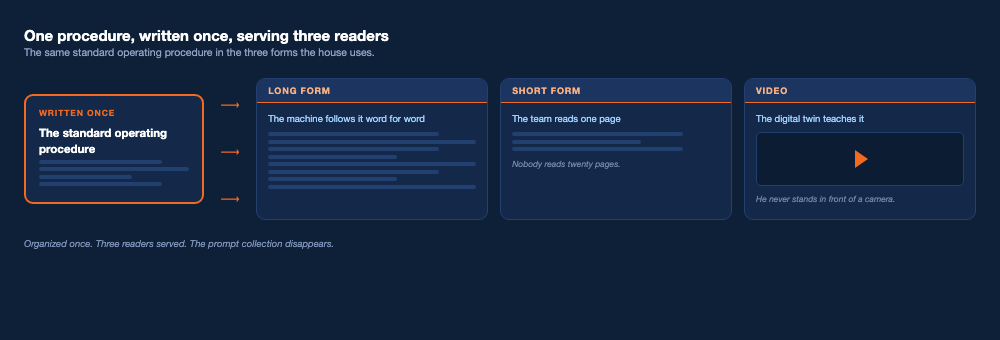
You keep prompts organized by writing each prompt you reuse as one standard operating procedure in three forms: a long form the AI follows word for word, a short form the team reads, and a video a digital twin teaches.
Cut the process before you write it down. Once a process is built we look to slash it in half at the same productivity or higher, then go line for line asking whether each remaining step could be removed. Writing a bloated process down makes it permanent and hands it to a machine to run at speed.
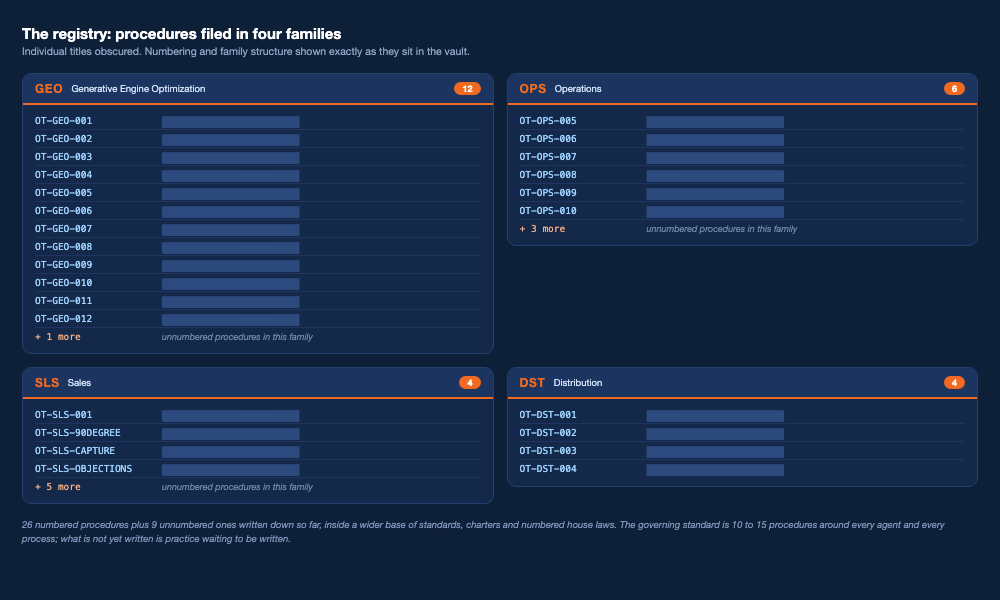
Every agent in our house is built to a standard of 10 to 15 procedures around it, with ledgers and audit logs underneath, so variance, root causes, and the cost of every answer are tracked while efficiency climbs. The procedures exist as practice first and get written down as the system reaches them; the standard is what governs, not the file count.
One written procedure cut a client’s interviewing from well over 60 hours a week to roughly a tenth of that, and the machine now runs that first round start to finish.
What should I do with the prompts I keep reusing?
You keep your prompts organized by turning every prompt you reuse into a standard operating procedure, the written steps a task follows every time, and writing that procedure once in three forms. The long form is the machine’s law book: my agents, AI assistants trained on our written procedures, run it verbatim. The short form is the human’s card: I can’t expect my team to read a 20 page document, so the team gets the one page that matters. The video form comes from my digital twin, an AI version of me that looks and sounds like me: I connect the procedure to an AI platform, the twin teaches it on camera, and I never stand in front of one. One piece of writing, three different readers.
A prompt you keep reusing is a procedure you haven’t written down yet. Write it, number it, own it, and the machine runs it. The collection stops mattering.
Right now your prompts sit in chats, in notes, in docs, and the one you need is never where you left it. When someone shows me a thousand saved GPT prompts, my first thought is that they don’t understand structure. “They can be the most organized person outside of that, and it means nothing. If you don’t have structure, it’s no different than the entrepreneur wearing every hat, micromanaging every little detail.”
This holds whether or not you use AI at all. If there’s no AI anywhere in your business, you still need standard operating procedures that remove you from the middle of it, and when you don’t have them it shows. You’re the one wearing every hat.
A standard operating procedure is the steps a task follows every time, written down, stated once, and enforced always, so the failure is prevented before it ever happens.
The first SOP I ever implemented was at a Brazilian steakhouse. The house strategy at those tables is to fill you up on salad and carbs before the meat arrives. The first thing I do walking in is turn my card green, then give the server the procedure before anything hits the table:
“I came here for meat. I don’t need any sides. In fact, bring the beef rib you’re usually hiding in the back out first, so they know I’m not here to play.”
That’s now how every Brazilian steakhouse I walk into runs. They operate my standard operating procedure instead of theirs, and theirs was built to fill me up. Mine also says bring the premium meat, the cut they only carry to the table when a guest asks for it. When I walk in, they know that’s the first thing to bring. They’re trained to my standard.
My philosophy around procedure came out of real estate. My first standard operating procedure there was detailed enough that every minute cost was accounted for. A toilet is the best example I can give you. It ships with a standard wax ring. We knew that ring wouldn’t last on that install, so we bought a jumbo wax ring instead. We bought the hose that connects the toilet to the waterline. In the SOP, which we call a scope of work, we wrote in the plumber’s tape that wraps the threading, because the tape is a cost and it gets its own line item.
That level of detail is why we landed our project costs inside a 10% variance. The failures I had in real estate, and I’ve had plenty, came when I became cocky and stopped following my own process. What they were really protecting against was variance, because variance costs money. Any dollar you can’t predict or control is hurting your business. That is the whole reason procedure exists. I started by purchasing procedures other people had written. Today, in my own business in a different industry, the rule is mine and it’s short: anything done more than once gets a process.
How can I create an effective SOP for my small business?
You create an effective SOP by finding the work you do repeatedly, writing it out fully, then cutting it down until only the work is left.
Find the work you do repeatedly. List every process you touch, then mark the ones you touch again and again. Sending an email qualifies. So does a build with thirty-six steps.
Give every procedure a number and a family. Two digits, three letters, then the name — 01-OPS-New-Client-Intake. The number keeps the order, the family keeps the neighbourhood.
Write it long before you write it short. Build it large with your whole thought process in it. Cutting what is not needed is easier than hunting for what is missing.
Cut everything that is not the work. Once it is built, slash it in half. The bar is the shorter version at the same productivity, if not higher.
Decide who writes it and who approves it. Nothing becomes law until it passes approval.
Find the work you do repeatedly
List out every process you touch. Then mark the ones you touch repeatedly. Sending an email qualifies, and so does a build with thirty-six steps in it.
If you’re new to this and don’t have a method yet, go find an effective strategy for the thing you’re documenting and write that in. You don’t have to invent the approach, and you don’t have to work it out alone. Ask us and we’ll help you build it.
Give every procedure a number and a family
We number every procedure and file it by family: 00-OPS, 00-GEO, 00-SLS, 00-DST. Two digits, three letters, then the name. Your first file might be 01-OPS-New-Client-Intake. The number keeps the order, the family keeps the neighbourhood, and an agent pointed at that folder knows exactly what it’s holding. Start there and you have already solved the problem the prompt pile creates.
Write it long before you write it short
Initially I build my procedures large, with all of my thought process in them. It’s much easier to cut what isn’t needed than to go hunting for what’s missing.
Doing something every day doesn’t mean I remember the mechanism of the process. Sometimes I have to be in the act and record myself working in real time, then go back and watch it to find my actual process. That recording is where the first draft comes from.
I get into a groove and the work gets done. Someone coming after me follows what they think is the same process and doesn’t get the same result, because the part that made it work was never written down. Documenting every step is what makes the process consistent, and a consistent process is what lets you step out of the business.
Cut everything that isn’t the work
Once the process is built, we cut the waste and any inefficiency out of it. The KPI for the shorter version is simple: it has to match the same productivity or higher, with the waste gone. Then we go line for line and ask one question of every remaining step. Could this be removed? Most of my first pass dies right there, and what survives is what the agents run.
Who writes the procedure, and who approves it
After years of learning how we operate, our agents write their own procedures, and they write ways to run them more efficiently. How do we cut token usage on a task. Where does a step repeat itself. I review what they draft, then I put it into effect. Nothing becomes law before that.
Every process and every agent is built to a standard of 10 to 15 procedures around it, filed in families we call GEO, OPS, SLS, and DST. Even the guardrails are procedures: the rules deciding what an agent must never say and never do are written and versioned like everything else, so no quiet edit ever moves one.
Under the procedures sit the ledgers. A ledger is how you know where a thing is and what it did. It is the GPS to your own operation: which agent owns what, where the procedure lives, what ran, what it cost, what went wrong. Ours track variance, root causes, issues across every agent we run, and the cost of every token the machine spends. We track all of it so we can minimize all of it while efficiency climbs. Every agent here runs under a Training Brief, the standing document that trains it the way you’d train a new hire. The brief exists; what’s in it stays in the house.
Using this blog as the example. Before a word was drafted, the agent asked me a set of questions and waited for every answer. Then it asked follow-up questions, worked out what belonged in this piece, and built a bank of what still needed to be added. It researched to confirm what I told it actually held up, because repetition and familiarity are exactly how people skip steps. We test what we preach in the article, then the article works off that. Before the questions, it researched what the market is asking for: real searched queries pulled from data, never invented ones. Then it dialed the article to that demand, and I graded the draft with a red pen against a written rubric. Questions first, research underneath, the work dialed to what people are asking for. For this topic we built our own category, because the need was not being served, and we could build it because the agent base underneath it’s elite.
What are common mistakes to avoid when writing SOPs for small businesses?
The five common mistakes are allowing the AI to do the thinking for you, adding an agent to a business that has no system, writing the procedure for a human when a machine has to execute it, not having guardrails, and delegating a task that was never written down at all. They’re ranked here with the worst first.
I. Allowing the AI to do the thinking
Owners run ChatGPT like a business partner, then find out the research was wrong and the sources were garbage.
Through Overtime Global I’ve met with boards, and the recurring thing is someone on the AI panel raving about an initiative that makes no sense, with the AI doing the thinking for them. Not proprietary AI either. Tools pulling their information from the popular vote on Reddit.
One board in particular stands out. I walked in and the panel was raving about how they could build lessons with AI. The lessons didn’t make sense. The doctrine underneath them was garbage, and nobody in the room had the knowledge to notice.
If you don’t have the knowledge, you shouldn’t be doing the thing because AI taught it to you. A large share of the failures I see come from exactly that: people using AI to replace knowledge they never had. Build your procedures that way and two things happen. It won’t be replicable, and it’ll have no value to you, because you won’t understand why you’re doing it, you can’t explain it to anyone, and it turns into a tireless headache for everybody it touches. You can’t implement a system you have no idea how to sustain.
Nobody chooses the one size fits all recipe for anything in their life until they’re shopping as a consumer. Why hand your business to a one size fits all approach from a system that has never understood the intricate nature of your operation?
II. Adding an agent to a business that has no system
An AI agent has to operate inside a system. Plugging one in without one only accelerates your mistakes, because the AI surfaces them efficiently and then repeats them at speed. It was never a replacement for job knowledge and education. Build the system first, then put the machine inside it.
III. Writing for a human when a machine executes it
A page a person can follow and a page an agent can follow are not the same page. That’s why every procedure here is written once, in three forms, and we call it a Field Goal. We score a point for the human version, the short form the team actually reads. We score a point for the machine version, the long form the agent runs verbatim. We score a point for the video version, where the digital twin teaches it. Three points off one kick. A procedure that only scores one point isn’t finished. Write only the human version and your agents can’t run it. Write only the machine version and your team won’t read it.
IV. Not having guardrails
The rules deciding what an agent must never say and never do are themselves written and versioned as procedures in our house, so no quiet edit ever moves one. An unwritten rule is a rule that changes without anyone noticing.
V. Delegating what was never written down
This is the one I hear most on calls. The assistant enters the work wrong, nobody wrote the system down, and the rework lands back on the owner’s desk. That’s not a character flaw and it’s not a bad hire. It is a missing page.
One written procedure cut a client’s interviewing from well over 60 hours a week to roughly a tenth of that. The client operates in an industry where regulation makes improvisation expensive, and the owner was interviewing well over 60 hours a week to land one or two good candidates. A screening quiz was already in place; the wasted hours went to everything a quiz can’t ask. The procedure we wrote was built around exactly that qualification gap. The machine conducts every first-round interview and asks the follow-up questions a quiz can’t. It notices something mid-conversation, asks about it, and surfaces what a fixed set of questions would never reach. It also gets people comfortable. Candidates talk to the agent more openly than they talk to a person, because they relax thinking they’re just talking to AI and stop performing for an interview. It evaluates who passes, narrows the field to one, and the first human interaction any candidate has is the in-person meeting with every document already in place. Sixty-plus hours a week came back from one page of writing the machine executes.
What does an SOP need so your AI can actually run it?
The template below is the machine version — point two of the Field Goal. It is the one almost nobody writes, and it is the only one an agent can execute. A human fills the gaps in a vague instruction without noticing. An agent does not: it either has the information or it invents something. Every field here exists to remove a place where it could invent.
The human version of the same procedure is this one cut to what a person needs to be reminded of. The video version is the twin walking through it. Same procedure, three forms, one kick.
How do I keep my procedures from going stale?
Every prompt you reuse becomes one written procedure, and the pile stops growing, because a procedure is something you maintain instead of something you lose. It isn’t only the prompts either. The same move applies to the system around them.
Maintenance never stops. A procedure is never finished. Ours get revised whenever something proves more efficient or a miss exposes a gap, and there’s always an adjustment to make. Every revision follows one principle: delete waste, increase efficiency. Nothing in the registry has been retired yet. Everything keeps getting sharpened.
I walked into a head coach’s office once, mid-season, and he already had next summer’s practice schedule finished. Eight months out, done, while everyone else was watching that week’s game.
His schedule doesn’t change much year to year. His philosophy around it does. He improves it, he enhances it, and he can only do that because it’s written down. Improving a process that exists is easy. Rebuilding one you never tracked isn’t. Written down, your attention goes to making it better instead of remembering what it was.
That’s the same reason we do the work now. We do it once so we don’t have to do it again.
When I began my career as an entrepreneur, I came in understanding that saving money is a risk. At 3 percent average inflation, a dollar becomes 74 cents in ten years, 55 cents in twenty, and 41 cents in thirty, and the basket of things I buy inflates faster than 3 percent. A dollar can’t sit.
“Today’s dollar has to earn interest, and not only earn interest: it has to go out and recruit other dollars to come back with it, that are also earning interest.”
Jon Jack, Founder, Overtime GO
Now look at your prompts the same way. A saved prompt is a dollar sitting still. It loses a little value every time the tools change and every week you can’t find it. A written procedure is the dollar that recruits. It runs the agents, trains the team, and spawns the procedure after it, because writing the first one shows you the next three. It isn’t only the dollar either. It’s the cost of that dollar, which is the cost of your labor standing in the middle of work a page could be doing. No agent in our house arrived with its 10 to 15 procedures. Every stack compounded from one.
The owner who writes one procedure this week isn’t doing paperwork. You’re becoming the owner whose business runs without you standing in the middle of it. Nobody starts organized. My first procedure was delivered to a waiter over a plate of steak.
Action Item: Open your saved prompts and pick the one you reuse most. Write it as a procedure: the steps in order, the way you run them when the task goes right. That page is your first SOP, and it will outlive every prompt in the pile. When you want the machine to write and run the rest with you, have Overtime GO build the system: System Check.
Key Takeaways What should I do with the prompts I keep reusing? You keep your prompts organized by turning every prompt you reuse into a standard operating procedure, the written…
Everyone’s building AI agents. Nobody’s grading them.
Key Takeaways
AI phone agents work when they are built by someone who knows the platform, tested with real dialed calls before launch, and maintained after. Untested agents fail quietly while sounding fine.
The reliable way to judge an agent is a computed grade from the receipts and the sound together: the calendar entry, the text log, the record, and the human feel of the call. A call must pass both.
Three years of daily monitored calls show the arc: constant issues at the start, none today, and still tweaks in every category, because maintenance never ends.
Do AI phone agents actually work?
Yes, AI phone agents work when three conditions hold: the agent is built by someone who knows the platform, it is tested with real dialed phone calls before launch, and it is maintained after. In three years of daily monitored business calls, that pattern has never broken: graded agents book real appointments all day, and ungraded agents fail quietly, with wrong time zones, ghost bookings, and texts that never send. The failures are never loud, which is exactly why grading exists.
Every claim in this article comes from our own graded records: three years of daily calls at Overtime GO, 2023 through 2026, with the enterprise engineering inherited through our parent company, Overtime Global.
Why do most AI phone agents fail?
They were built by an overnight expert who disappears when something breaks: the client bought from someone who learned the tool last month, and there was no support when it mattered.
I bought my dream car once, my first Bentley. Then a headlight went out, and replacing it meant pulling the entire engine, changing the bulb, reinstalling it, and months of waiting on parts from a manufacturer out of the country. That is what buying from a non-expert gets you: something small breaks, and you wait for their expert to finally have time on what might be a simple spark plug. And an AI agent has a lot of spark plugs: the voice platform, the calendar, the texting line, the CRM, the phone number itself, and once one is off, the system does not work.
How do you test an AI agent before trusting it?
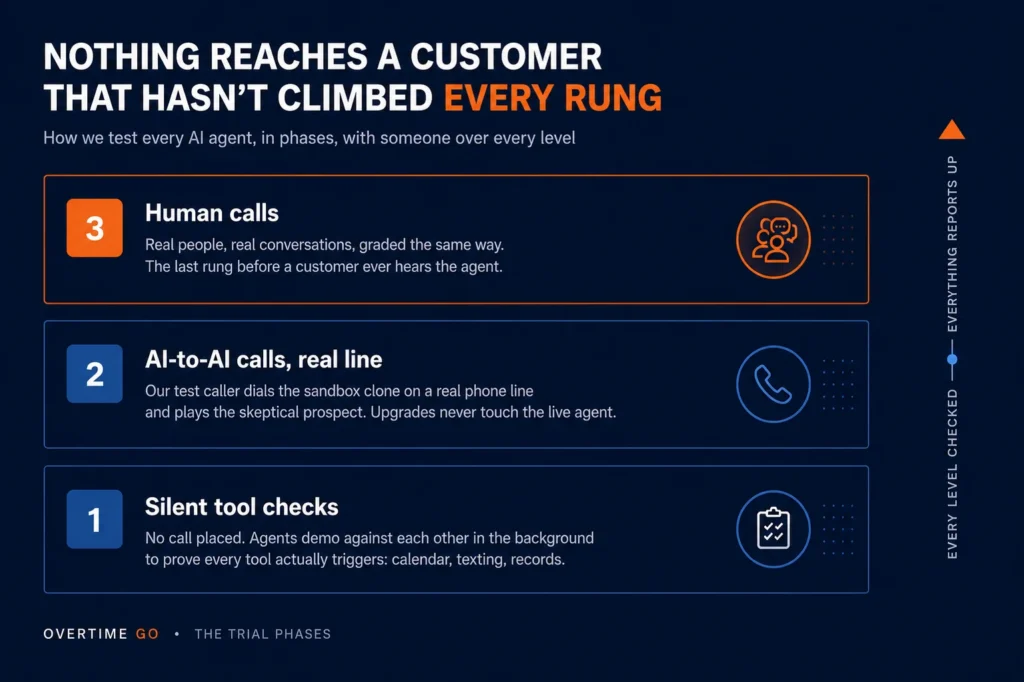
Real dialed phone calls graded against a written standard, not demos, not typing at it in a chat window.
Phase one is silent: no call placed, agents demo against each other in the background just to prove every tool actually triggers. Phase two is AI to AI: our test caller Marcus, a skeptical prospect on a real dialed line, against a sandbox clone of the live agent so upgrades never break real calls. Phase three is human calls. Field level does the work, a layer checks the field, and it all reports up.
We build on ElevenLabs, not by default but by testing. We ran the field: Google’s agent builder, Vapi, GoHighLevel‘s AI agents, and the other platforms you can build on. ElevenLabs won.
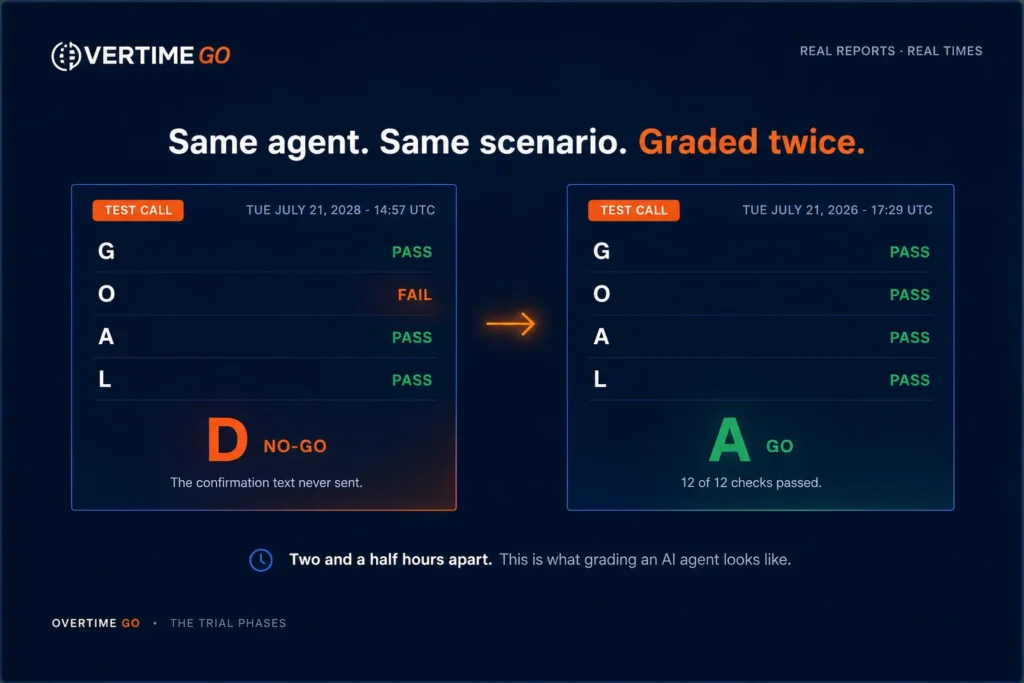
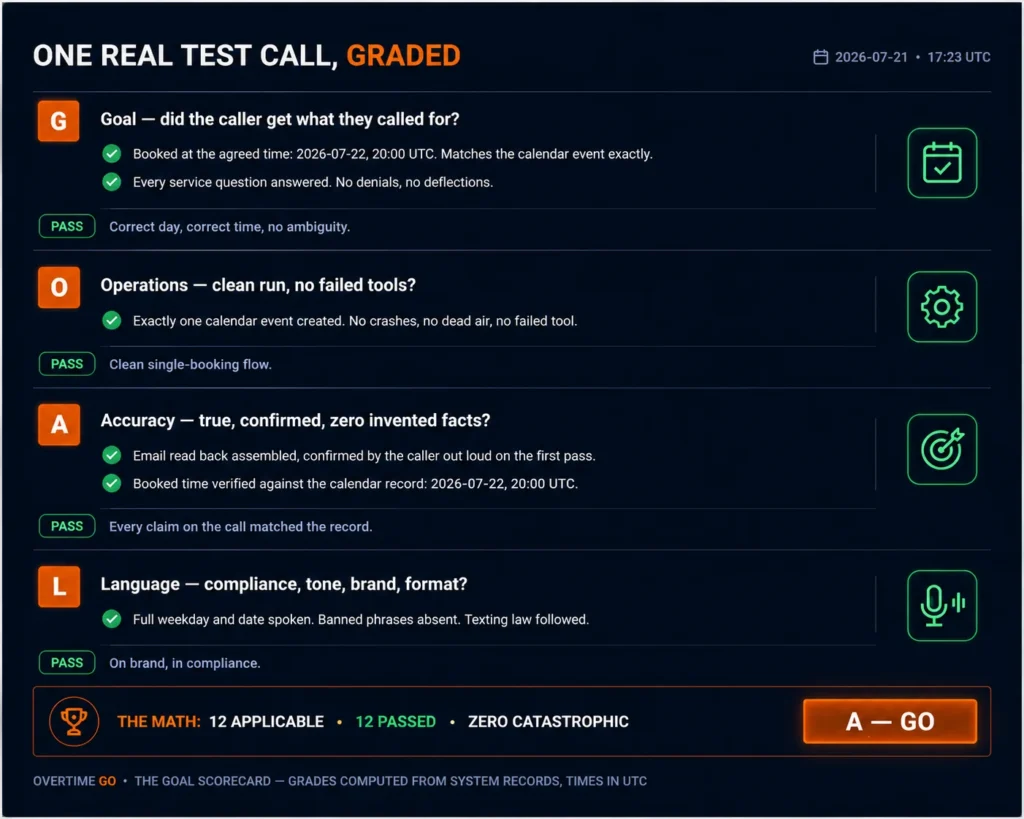
Every test call walks away with a report card, graded against GOAL, the scorecard we published:
G, Goal. Did the caller get what they called for?
O, Operations. Clean run, no failed tools?
A, Accuracy. True, confirmed, zero invented facts?
L, Language. Compliance, tone, brand, format?
The grade comes from two places: the receipts and the sound. Did the calendar event actually get created, the text actually send, the record actually update? Did the call feel human, no lag, no robot pauses, no talking over the caller? A call can sound perfect and fail on the receipts, or nail the receipts and fail on the sound. It has to pass both.
What do three years of daily calls teach you?
That failure is quiet: a failing agent sounds fine on the call and is broken everywhere you cannot hear. Across thousands of monitored conversations we have caught bookings that were never created, events booked an hour off, invites sent to a misheard address, confirmation texts that never delivered, and behavior that drifted when the underlying model changed without us touching it.
The arc of those three years: constant issues at the start, then fix, retest, fix, retest, every day. Today it is no issues, and there are still tweaks in every category, because maintenance never ends. The published scorecard is recent; the discipline behind it is not. It formalized what three years of daily calls already built.
A human employee gets a performance review every six months. Our agents get one on every call.
Can you trust your own grader?
No. Test the tester. At one point our agent was working fine and our grader was off; the system built to catch lies was the thing lying. We caught it by pulling the actual calendar entries and logs and comparing them to the grader’s claims. A grader you cannot audit is just a second agent you are choosing to believe.
“Most people practice until they get it right. Champions practice so they do not get it wrong. That is the philosophy we keep with every agent we build.“
Jon Jack, Founder, Overtime GO
Your AI agent is a reflection of you and your company. Is it representing you in the best light?
Next in the series: the operating system those graded agents run inside: Those 50 open ChatGPT tabs won’t save you.
Key Takeaways Do AI phone agents actually work? Yes, AI phone agents work when three conditions hold: the agent is built by someone who knows the platform, it is tested…


 Jon Jack | Founder of OvertimeGO